Search across all your AI chats at once
Search every message in your ChatGPT, Claude, Gemini and Grok history with TidyChats, filter by role, date or phrase, and jump straight to the matching message.
By Shaig Khaligli · Updated · 5 min read
TidyChats builds a full-text index of your ChatGPT, Claude, Gemini and Grok chats inside your browser, so you can search every message, not only titles. Press Cmd+Shift+F (Ctrl+Shift+F on Windows and Linux) to search the site you're on. Click a result and you land on that exact message. Search on the AI you're using is free with unlimited results; searching all four AIs at once (Cmd+Shift+. / Ctrl+Shift+.) is part of Premium.
ChatGPT has its own chat search, and Gemini has a search history page, so for a quick lookup on one site I'd try the native search first. The native options are covered in how to search your ChatGPT history. This tutorial is for when you want every word, every assistant, in one place.
Step 1: Let TidyChats index your chats
Search only finds what's in the index, so it helps to know how chats get there. The index holds the full text of every message you sent and every reply, plus chat titles. It lives locally in your browser's storage, and matching is plain case-insensitive word matching, not semantic search. Search for words that were actually in the chat.
Each platform is read a little differently:
| Platform | How your history gets indexed |
|---|---|
| ChatGPT | Through ChatGPT's web API using your existing session: the main list, starred, archived and Projects. Chats download one at a time, on purpose. |
| Claude | Through Claude's web API using your session, 3 chats in parallel. |
| Gemini | Through Gemini's internal web API. If that fails, it falls back to "Reading Gemini chats page by page in a small window". |
| Grok on grok.com | Through its web API, with the same page-by-page fallback. |
| Grok on x.com/i/grok | There's no API, so chats are indexed as you open them. |
On every site, the chat you're looking at is indexed as you use it. History sync runs in the background (you can switch tabs), refreshes every 30 minutes when you open a supported site, and resumes unfinished syncs. Progress shows in the toolbar popup under "Your AI chats", not in the page.
To kick it off by hand, use Index all on the sync line in the Folders, Search or Clean up view, Sync all chats in the toolbar popup, or Index all chats in the command palette.
Why ChatGPT takes longer
ChatGPT limits how fast chats can be read, so TidyChats paces itself: at most one chat every 6 seconds and 300 an hour, nothing while you're chatting, and longer pauses if ChatGPT pushes back. The toolbar popup shows something like "Adding full text 12 / 379" with a bar and "Search works meanwhile." There's no time estimate, and for a large account it can take hours. Pushing harder doesn't help, since your own ChatGPT tab can get rate-limited too.
Search isn't blocked while this runs. Until your index is complete, TidyChats also asks ChatGPT's own search to fill the gaps, which means those queries go to ChatGPT.
If you have a big history, I'd take the faster route: click Email me my ChatGPT export in More tools > Backup & restore (the popup also offers it when more than 50 chats are waiting). That requests ChatGPT's data export. When you click the download link in OpenAI's email, TidyChats imports the zip on its own. If it doesn't, use Choose the .zip… in the same place.
Step 2: Search the platform you're on
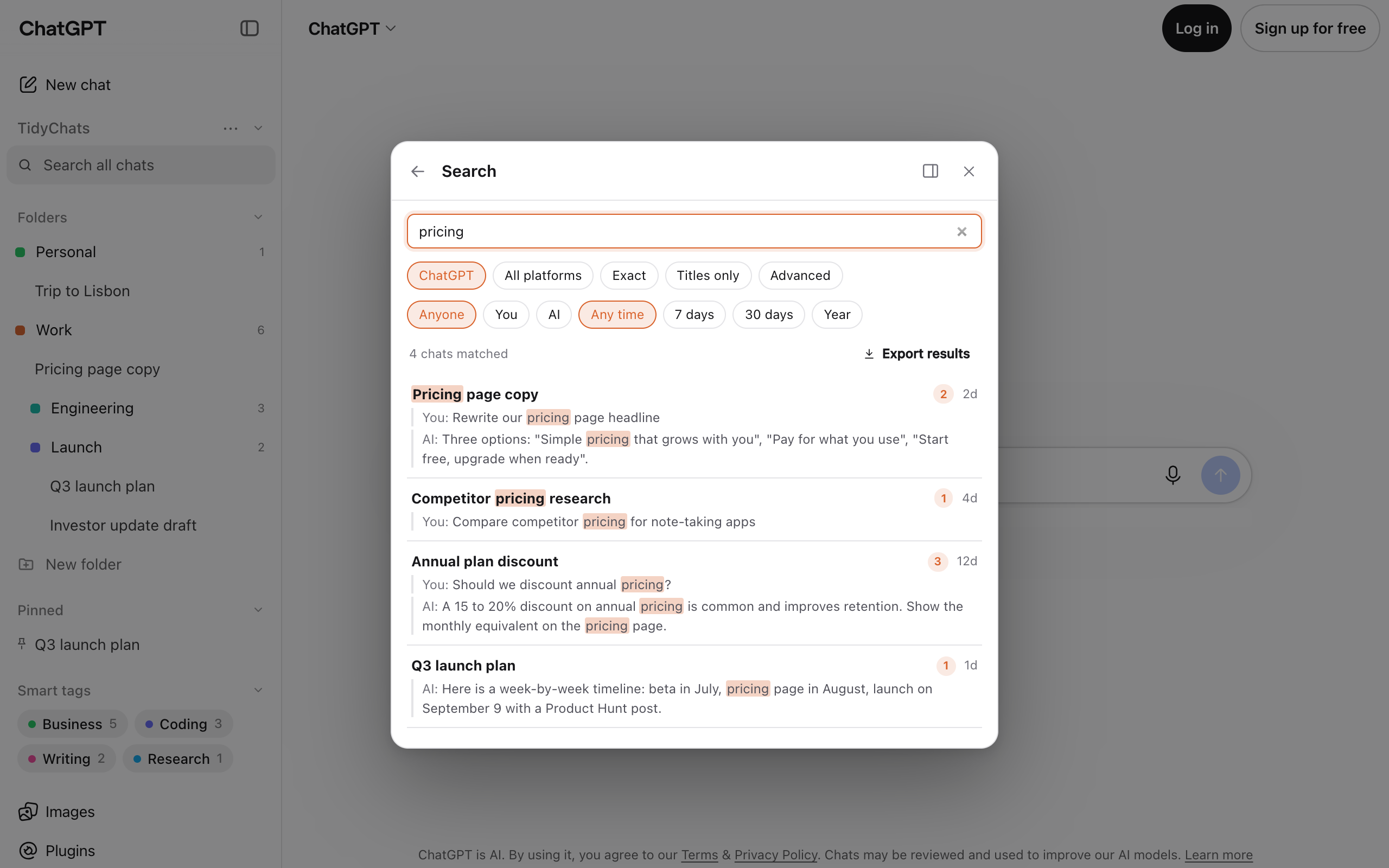
Press Cmd/Ctrl+Shift+F, click Search all chats in the TidyChats section of the sidebar, or open the TidyChats window and type in the "Search all your chats" box on Home. The box reads "Search every message…" with a few hints for operators.
Each result shows the chat title, how many matches it has, how old it is, and up to 3 highlighted snippets labeled "You: " or "AI: ".
Step 3: Search all platforms at once
When you can't remember which assistant you asked, search everything. On Free this shows the 5 newest matches across all four AIs, with a note saying how many more matched. Premium, a single plan for all four AIs, shows them all. Any of these works:
- Press Cmd/Ctrl+Shift+. (that's the period key). On a tab that isn't an AI site, it switches to your most recent AI tab and opens TidyChats Search there.
- Pick Search all platforms in the command palette.
- Click the All platforms chip in the Search view.
Results get a platform badge so you can tell a Claude match from a Gemini one. You can also select text on any web page, right-click and choose Search TidyChats for "…".
Step 4: Narrow it down with filters
The chips under the search box cover most cases:
- Exact for exact phrases, Titles only to skip message text.
- Advanced adds "Must include" and "Exclude" fields.
- Role: Anyone, You or AI.
- Dates: Any time, 7 days, 30 days or Year. These use the chat's last-updated date, not the date of each message, so an old chat you replied to yesterday counts as recent.
If you'd rather type, these operators work in the box: "exact phrase", -word or -"phrase" to exclude, role:user or role:assistant, platform:chatgpt, after:YYYY-MM-DD, before:YYYY-MM-DD, in:title and tag:name.
A trick I'd recommend: role:user. Most people remember their own wording better than the AI's, so searching only what you typed often finds the chat faster.
Step 5: Jump to the message
Click a result and TidyChats opens the chat, scrolls to the matching message and briefly flashes it. Results from another platform open in a new tab.
If you need the matches themselves rather than the chats, Export results saves only the matching messages as a Markdown file. For whole conversations, see exporting chats to PDF and Markdown.
Caveats worth knowing
- Free shows part of the results. Search on the site you're on shows the first 25 results, and searching ChatGPT, Claude, Gemini and Grok together shows the 5 newest matches. Premium shows every result and is one plan for all four ($6.99/month, $49/year or $99 lifetime); see pricing.
- Grok on x.com only indexes chats you open. Grok on grok.com syncs the full history, and both share one Grok index.
- Gemini and Grok rely on undocumented internal APIs. If one changes, TidyChats falls back to the slower page-by-page import in a small window.
- Multiple accounts are kept apart. With several Google accounts in Gemini, results show the account you're currently in.
- Your index stays on this browser. Chat content doesn't sync to your other browsers, even when you're signed in. More on that in local-first AI privacy.
Search covers finding things. For keeping your history in order day to day, see organizing conversations into folders.
Ready to try it yourself?
Add to Chrome